Showing posts with label Address. Show all posts

Monday, 5 October 2015

Note4 fails to optain IP address on wifi at work


Hi guys,

My stock note4 on 5.1.1 doesnt connect to the wifi at work on the 1st floor where my workstation is. It does connect easy on the ground floor.
My laptop and ASUS tablet connects easy on the work wifi.
As a result i have to bring my own MIFI device to connect over my own personal wifi contract with Telkom.

When i try connect on the work wifi it says "obtaining IP address", then says "failed". But i can connect when im on the ground floor.

It did the same even before i upgraded the firmware OTA at home.

What could be the problem?


Friday, 2 October 2015

[GUIDE] [How To] Change IMEI number and WiFi MAC Address in Yuphoria


Requirements:
1. Rooted Yuphoria phone
2. Xposed Framework (How to Install Xposed Framework)

Steps:

1. Install the app: Phone ID IMEI Changer

2. Open Xposed Installer, select 'Modules' and activate the module and reboot the phone.

3. Open the Phone ID Changer app and change the IMEI number & MAC Address as required.

Note:
Using this method, the IMEI number and MAC address is not permanently changed.
If Xposed is disabled or if app is uninstalled, the original IMEI is restored.


Thursday, 1 October 2015

[APP][2.1+][FREE]Easy Navigation - fast address navigation (including Widgets)


Hello

i want to present you my app and hope that you have some feedback for me. Now Version 3 is avaliable with material design.
Have FUN

Easy Navigation

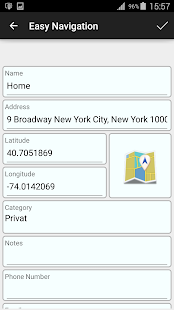
Save and manage your favorite places and start the navigation by just one click or by widget with this easy-to-use app.

Supported Navigation Applications:
- Google Maps - HERE - Waze - Sygic - Mapfactor - Navigon - CoPilot GPS - OsmAnd - Wisepilot - Be-on-road

Supported navigation modes:
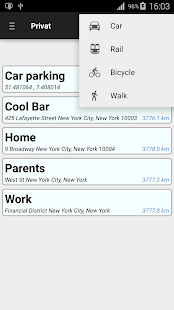
- car - public transport (train, bus) - bicycle - foot

Features:
- You can add places based on their address or GPS coordinates.
- Start navigation with just one click.
- Choose your route based on means of transportation. By car, public transport, bicycle or foot.
- You can add Widgets for your destinations to start the navigation directly from your home screen.
- Sort your frequently used addresses by the help of categories (e.g. family, friends, business contacts).
- Enables you to set exact place markers by using the map or GPS coordinates.
- Share your locations with friends by sms or any other applications.
- Save your current position, for example to quickly find where you have parked your car.
- Backup your locations or export them in a excel file and import them on another device or after an update.
- Supported by Android smartphones and tablets beginning with Version 2.1.

Note: To call up extended functions for your locations, press longer.

Main Menu Map Settings Edit Navigation Modes